Marketing
Trackable Links & QR Codes
Know who clicked a link or scanned a code, and act on it.
What it does
What Trackable Links & QR Codes gives your practice
- Trackable links you place in messages
- A click can start an automation or tag the patient
- QR codes for forms, booking and review links
- Put codes on handouts, signage and cards
- Reusable snippets for common replies
- Click history on the patient record
Trackable Links & QR Codes in detail
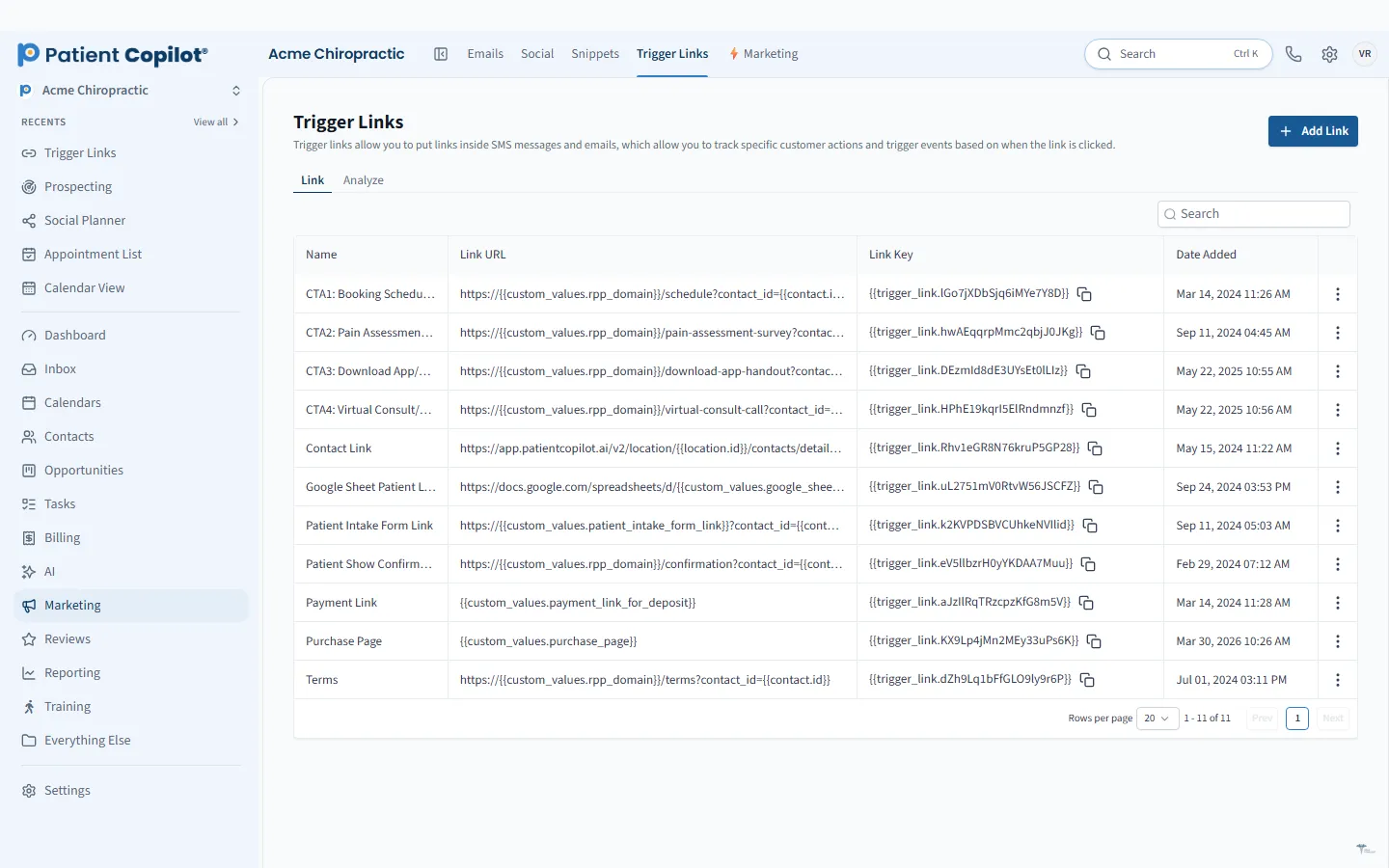
Trackable links turn offline and online marketing into something you can measure. With Trackable Links & QR Codes in PatientCopilot, you can see who clicked or scanned, then follow up while interest is high.
Create trackable links for messages
A trackable link looks like a normal link, but it records who clicks. Place trackable links in the messages you already send:
- Text message campaigns and reminders
- Emails and newsletters
- Social posts and bios
Click history appears on the patient record, so your team sees which messages people engaged with.
A click can start something
Knowing who clicked is useful. Acting on it is better. A click can start an automation or tag the patient. For example:
- Tag people who clicked a link about a new service
- Send a follow-up text to someone who opened your booking link but did not book
- Create a task for your front desk to call an interested lead
Create a trackable QR code
QR codes bring your printed materials to life. You can create codes for:
- Forms, such as new-patient intake
- Booking links
- Review links
Print them on handouts, signage and cards. Patients scan with their phone and land exactly where you want them.
Name your links and codes clearly, such as spring-flyer-booking or front-desk-review-card, so reports are easy to read later. Test every QR code with a phone before you print it, and make sure the page it opens works well on mobile.
How it works
- Create a trackable link or QR code for a specific purpose, such as a booking page.
- Place it in a message, a flyer, a business card or a sign.
- When someone clicks or scans, the activity is recorded.
- An automation can tag the patient or send a follow-up.
- Review click history on the patient record and compare placements.
Use cases for offline marketing
- Chiropractors: a code on a community event flyer that opens your new-patient offer.
- Physical therapy: a code on a handout that links to home exercise instructions or your booking page.
- Dental offices: a code on the front desk sign that opens a review link.
- Med spas and wellness practices: a code at an event table that signs people up for a consultation.
Using a different code for each placement tells you which ones people actually use.
Make sure follow-up is welcome
Only message people who have opted in to hear from you. A click on a link in an email you sent to opted-in contacts is a good signal for a gentle follow-up. Keep messages helpful and respectful of preferences.
Trackable links work with the Patient Inbox, Automation Workflows, Social Media Calendar and Reviews & Testimonials. Use them to measure what is working across your marketing and see how it relates to bookings in Which Marketing Brings Patients. Trackable Links & QR Codes is included in the Copilot plan and in Autopilot.
FAQ
Trackable Links & QR Codes questions
Can QR codes be tracked?
Yes. Trackable QR codes record scans, so you can see which placements get attention and act on them.
How do I track flyers and mailers?
Give each flyer, card or mailer its own code or link. When someone scans or clicks, you can see which one it was.
Can a QR code open a form or booking page?
Yes. QR codes can point to forms, booking and review links.
Can a click start an automation?
Yes. A click can start an automation or tag the patient, and click history appears on the patient record.
Marketing
Related features
Ready to get started?
Sign up today and put an AI copilot on your front desk. Backed by a 14-day money-back guarantee.
14-day money-back guarantee. Cancel anytime.