CRM & Inbox
New-Patient Pipeline
Track every new-patient inquiry from first contact to booked visit.
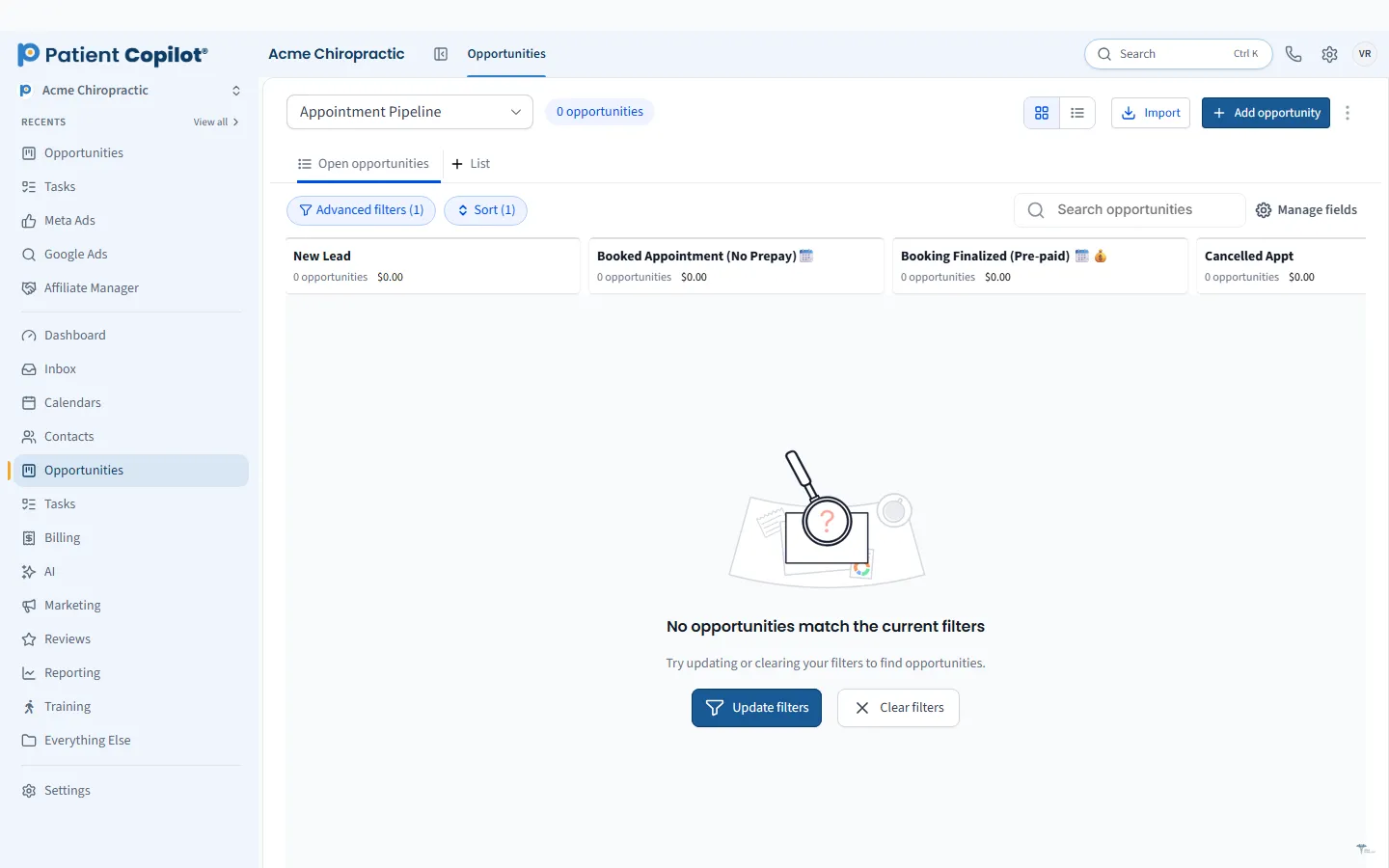
What it does
What New-Patient Pipeline gives your practice
- Kanban pipelines with your own stages
- Bulk actions on groups of opportunities
- Smart Lists to focus on stalled leads
- Forecast view of what is in the pipeline
New-Patient Pipeline in detail
A healthcare CRM helps your practice answer one simple question: what happened to everyone who reached out? The New-Patient Pipeline in PatientCopilot tracks each inquiry from first contact to booked visit, so leads do not disappear between a missed call and a calendar slot.
See every lead in one pipeline
Inquiries arrive from your website, phone, text, ads and social pages. The pipeline gathers them on a Kanban board, where each card is a potential new patient and each column is a stage you control. A typical chiropractic flow might be:
- New inquiry
- Contacted
- Consult booked
- First visit completed
- Care plan started
Dental offices, physical therapy clinics, med spas and wellness practices can rename the stages to fit their own process.
Keep follow-up from slipping
Most lost leads are lost to timing, not interest. The pipeline helps your team see who is waiting:
- Drag a card to the next stage as the lead moves forward
- Use Smart Lists to focus on stalled leads
- Take bulk actions on groups of opportunities
- Pair with Tasks so every lead has a next step and an owner
Forecast what is coming
A forecast view shows what is currently in the pipeline, so you can see whether your front desk has enough new inquiries in motion. It is a quick way to spot a slow week before it happens.
Keep stages few and clear. Four to six stages are easier for a busy front desk to maintain than a dozen. Review the board in a short weekly huddle, ask why each stalled card has stopped moving and decide the next action. That habit turns the pipeline from a record into a tool that actually books patients.
How it works
- Create a pipeline and name the stages to match your new-patient process.
- Add inquiries manually or let forms, calls and messages create them.
- Move each opportunity through the stages as your team follows up.
- Use Smart Lists to review stalled leads and take bulk actions.
- Check the forecast view to see what is in progress.
Source awareness
Knowing where an inquiry came from helps you decide where to invest. Because the pipeline sits next to your messaging, forms and reports, you can connect new patients back to the channels and campaigns that brought them in. Our Which Marketing Brings Patients reports build on the same data.
A CRM built for a practice, not a sales team
Generic CRMs assume a long sales cycle. A practice needs something closer to the front desk: quick responses, clear stages and easy handoffs. The New-Patient Pipeline lives alongside your Patient Inbox, calendars and automations, so a new inquiry can trigger a text, create a task and land on the board without extra steps.
The pipeline is included in the Copilot plan and in Autopilot. To get the most from it, set up Patient Records & Lists for segmentation, and add Appointment Reminders so booked visits turn into shown visits.
FAQ
New-Patient Pipeline questions
What is a healthcare CRM?
A healthcare CRM keeps track of people who contact your practice, from the first inquiry through booking and return visits. It shows who needs follow-up so fewer leads get lost.
How do I track new patient leads?
Add each inquiry to a pipeline and move it through stages you define, such as new inquiry, contacted and booked. Smart Lists help you focus on leads that have stalled.
Can I customize the pipeline stages?
Yes. Pipelines are Kanban boards with your own stages, so they match how your front desk really works.
Is there a forecast of what is in the pipeline?
Yes. A forecast view shows what is currently in your pipeline.
Ready to get started?
Sign up today and put an AI copilot on your front desk. Backed by a 14-day money-back guarantee.
14-day money-back guarantee. Cancel anytime.