Marketing
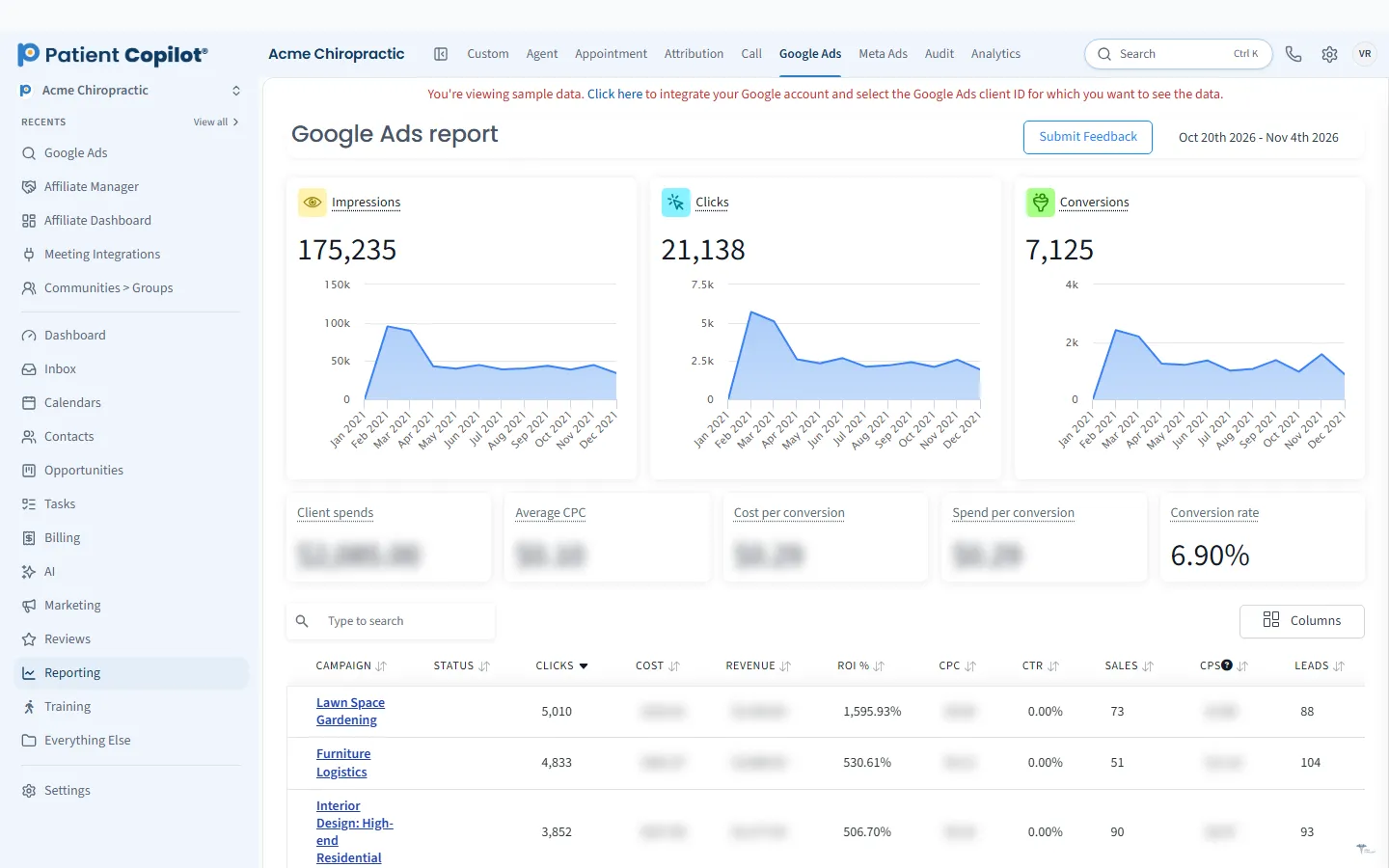
Google Ads in Ad Manager
Create and manage Google ad campaigns in the platform.
What it does
What Google Ads in Ad Manager gives your practice
- Create and manage Google campaigns from the Ad Manager dashboard
- Google ad performance next to your lead and booking reports
- Send new leads straight into your pipeline
- Part of the Autopilot plan
Google Ads in Ad Manager in detail
Chiropractor Google Ads put your practice in front of people at the moment they search for care. Google Ads in the PatientCopilot Ad Manager lets you create and manage those campaigns from the same dashboard where you track leads and bookings.
Search ads that bring in new patients
A person searching for back pain relief or a dentist nearby is ready to act. Search ads show your practice in those moments, so the right audience sees you without needing to know your name first.
- Create and manage Google campaigns from the Ad Manager dashboard
- Keep ad performance next to your lead and booking reports
- Send new leads straight into your pipeline
This applies to chiropractors, physical therapists, dental offices, med spas and wellness practices alike.
Keep ads connected to your front desk
An ad is only valuable if the lead is handled well. When a new inquiry lands in your New-Patient Pipeline, your team or your automations can respond right away, and the Patient Inbox keeps the conversation in one place. Quick follow-up is often the difference between a lead who books and one who calls the next clinic.
Make sure the page people land on matches the ad. If the ad promises a new-patient exam, the landing page should show that exam and a simple way to book. Tight alignment between ad and page tends to improve the quality of inquiries and saves your team from answering confused calls.
How it works
- Open the Ad Manager and start a Google campaign.
- Choose your goal, location and budget.
- Write ads that describe your services plainly and accurately.
- Launch, and watch leads arrive in your pipeline.
- Compare ad performance with your leads and bookings, then adjust.
Budgets, keywords and focus
Local practices usually do better with a focused campaign than a broad one. Start with the services that matter most to your schedule, such as new-patient exams, and target the area you actually serve. Watch which searches bring in useful inquiries and tighten the campaign over time. Keep your budget at a level you are comfortable testing.
Reporting that includes patients
Platform dashboards show clicks and costs. Your practice cares about inquiries and appointments. Because PatientCopilot shows ad performance next to leads and bookings, you can compare what you spent with what came in and decide where to put the next dollar. For a wider view of your marketing, see Which Marketing Brings Patients.
Healthcare policy basics
Google applies rules to health-related ads. Avoid claims you cannot support, do not imply you know a viewer's health condition, and keep patient information out of ad copy and landing pages. Check the current policies before launching.
Google Ads in the Ad Manager is part of the Autopilot plan, and available on Copilot as a paid upgrade add-on. It sits alongside the Facebook and Instagram, LinkedIn and TikTok options, so you can add other channels later without changing tools. Combine it with Local SEO and Local Listings & Google Profile for a full picture of how patients find you.
FAQ
Google Ads in Ad Manager questions
Is Google Ads worth it for a chiropractor?
It can be, because people searching for care are already looking. Results depend on your market, budget and how quickly you follow up. Tracking leads to booked visits is how you decide for your own practice.
Which plan includes Google Ads in the Ad Manager?
The ads platform is part of the Autopilot plan, and available on Copilot as a paid upgrade add-on.
How do I track phone and form leads from ads?
New leads can go straight into your pipeline, and ad performance appears next to your lead and booking reports.
Do healthcare ads have special rules?
Yes. Google has policies for health-related advertising. Review the current rules and keep ad copy accurate.
Marketing
Related features
Ready to get started?
Sign up today and put an AI copilot on your front desk. Backed by a 14-day money-back guarantee.
14-day money-back guarantee. Cancel anytime.